What is TCA?
- Oracle Trading Community Architecture (TCA) is a data model that allows you to manage complex information about the parties, or customers.
- Trading Community Architecture is the implementation of technology and applications to allow users to create and maintain relationships among entities. It is a way to understand who your customer interacts with inside and outside the enterprise.

Note: Customer, Vendor, Supplier are the terms that we come across very frequently.
For instance: We buy goods from a Shop Vendor so we are the Customer to that Vendor and the Vendor is our Supplier for that good. The Vendor gets goods from a merchant who actually produces it (Manufacturer), so now the vendor in-turn becomes a customer to the Manufacturer who is the Supplier.
The complete TCA can be related and runs around all these terms, these may be people we meet generally who might be a Supplier or Customer in our perspective.
Now moving ahead lets go in details about TCA.
How TCA Matters?
Before TCA:
- There are multiple customer definitions across the enterprise.
- It was very difficult to track current and historical information about the customers.
- There was a lack of support for mixed business.
- It was quite tough to understand relationships between customers and others (suppliers, partners, competitors)
After TCA:
- Create a central repository for the entire E-Business Suite to store information relating to all members of a trading community versus separate tables for each member-Prospects, Customers, Contacts, Employees, Partners, Distributors, Suppliers, Banks, etc.
- Record complex business relationships between Trading Community entities (including 3rd party relationships).
- Support all business models, industries, and geographies.

| TCA Data Model Components: | |
| Party | Represents any entity that can enter into business relationships with your organization – Organization, Person, or Group |
| Party Relationship | A binary relationship between two parties such as a partnership. Example: Adam is a specific person party and Eve Inc. is an organization party. Adam at Eve Inc. is also treated as a party with the type relationship |
| Location | A Street Address |
| Party Site | Associates a party with a location, indicating that party’s usage of the location |
| Contact | A person related to an organization, this can be a relationship between an organization and a person as well as between two people |
| Contact Point | Your avenue of contacting a party i.e. a phone number ,e-mail address or fax number |
| Customer Account | Represents a customer relationship between your organization and a party |
| Customer Account Site | A party Site that you use in relation to a customer account, i.e, a bill-to or ship-to address |
| Customer Account Contacts | A party contact that is used as a means of contacting the customer regarding his/her account |
TCA in 11i
- 11i TCA already equipped to handle the following entities
–>Customer
–>Employee
–>Student
Here is Summarize information of the tables Pre and Post 11i:


TCA in R12 Includes:
- New trading entities
–>Suppliers
–>Banks & Bank Branches
–>Legal Entity
TCA Data Model : Supplier & Customer
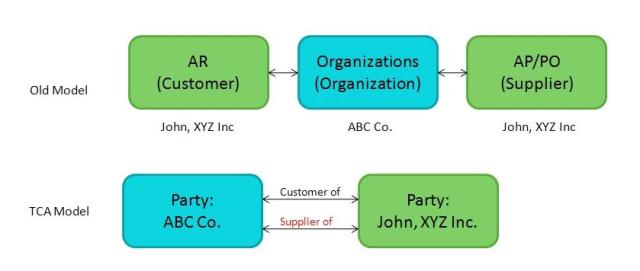
TCA in R12: Supplier Representation
- Supplier organizations are in TCA
- Terms of doing business with the supplier are in Purchasing / Payables
- Supplier organization, address, contact, phone, email etc. are all in TCA
- Employees are already in TCA, Payables using the same employee records in TCA
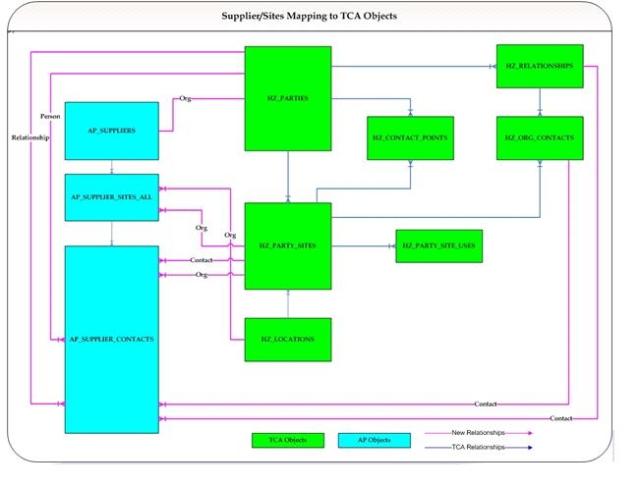
TCA – Suppliers:
- Technical details for R12 Supplier in TCA


TCA in R12: Bank Model
New Bank Account Model
- Central place to define internal bank accounts
–>Keep track of all bank accounts in one place
–>Explicitly grant account access to multiple operating units/functions and users
- Multi-Org Access
–>In the new model, bank accounts are owned by Legal Entities with the option to grant account use to Operating Unit (Payables, Receivables), Legal Entity (Treasury), Business Group (Payroll) .
R12 Multi-org access control
- MOAC is new enhancement to Multiple Organization feature of Oracle Application
- Enables Users to access the data from one or many Operating Units within a set of given responsibility
- Data Security is maintained using Multiple Organization Security Profile, Define in Oracle HRMS.
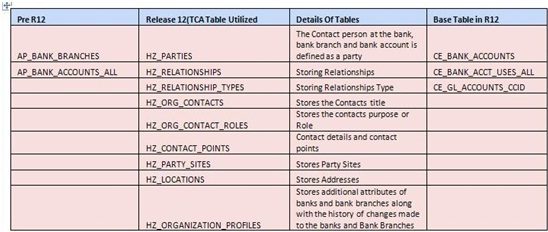
Three key CE tables now as
1. CE_BANK_ACCOUNTS
–>Stores bank account attributes
2. CE_BANK_ACCT_USES_ALL
–>Stores the bank account use attributes specific to Operating Unit (AR, AP) and Legal Entity (Treasury).
3.CE_GL_ACCOUNTS_CCID
–>Accounting data pertaining to the bank account use
- All of the bank, branch and bank account related attributes in AP_BANK_BRANCHES and AP_BANK_ACCOUNTS_ALL tables will be upgraded to HZ_PARTIES and the new tables in Cash Management.
The Changing model for Bank in Global working model

TCA in R12: Legal Entities
- Legal entity is created as a party of party type ORGANIZATION or PERSON
- An establishment is created as a party of party type ORGANIZATION.
- TCA creates a new classification category called “Business Function”. It is used mainly to model what business functions a party can perform in E-Business Suite
- For modeling legal entities and establishments in TCA, classification code “Legal Entity” and “Establishment” are created under the “Business Function” class category.
- An establishment is created as a party and always link to a party that is classified as a legal entity through the relationship model
TCA & Enhancement:
- The Trading Community Manager Responsibility, allows users to create a setup or update data sharing and security
- Customer Standard form that has been existing till R11i is finally gone.
- Oracle Introduced a brand new HTML UI built using OA Frame works leveraging TCA that can be used to manage Customers, Accounts, etc.

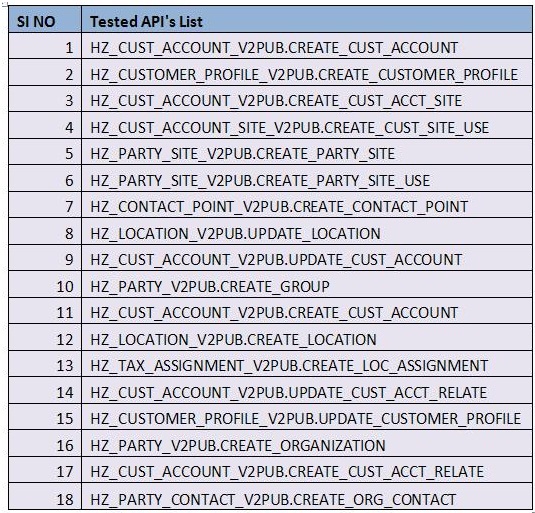
HZ(TCA) Tables in Oracle Receivables
HZ_PARTIES:
The HZ_PARTIES table stores basic information about parties that can be shared with any relationship that the party might establish with another party
key for this table is PARTY_ID.
Few Important Columns are
· PARTY_ID: Party identifier
· PARTY_NUMBER: Unique identification number for this party
· PARTY_NAME: Name of the party
· PARTY_TYPE: The party type can only be Person, Organization, Group or Relationship.
HZ_PARTY_SITES:
The HZ_PARTY_SITES table links a party (HZ_PARTIES) and a location (HZ_LOCATIONS) and stores location-specific party information. One par
optionally have one or more party sites. One location can optionally be used by one or more parties. The primary key for this table is PARTY_SITE_ID
Few Important Columns are
· PARTY_SITE_ID: Party site identifier.
· PARTY_ID: Identifier for the party. Foreign key to the HZ_PARTIES table.
· LOCATION_ID: Identifier for the party site. Foreign key to the HZ_LOCATIONS table.
· PARTY_SITE_NUMBER: Party site number.
· PARTY_SITE_NAME: User-defined name for the site.
· ADDRESSEE: Addressee information.
HZ_LOCATIONS:
The HZ_LOCATIONS table stores information about a delivery or postal address such as building number, street address, postal code, and directions t
This table provides physical location information about parties (organizations and people) and customer accounts. The primary key for this table is LO
Few Important Columns are
· LOCATION_ID: Unique identifier for this location
· COUNTRY: Country code from the TERRITORY_CODE column in the FND_TERRITORY table
· ADDRESS1: First line for address
· ADDRESS2: Second line for address
· ADDRESS3: Third line for address
· ADDRESS4: Fourth line for address
· CITY: City
· POSTAL_CODE: Postal Code
· STATE: State
· ADDRESS_KEY: Derived key that facilitates fuzzy searches
HZ_CUST_ACCOUNTS:
The HZ_CUST_ACCOUNTS table stores information about customer accounts , or business relationships that the deploying company establishes with
type Organization or Person. This table focuses on business relationships and how transactions are conducted in the relationship. Since a party can hav
customer accounts, this table might contain several records for a single party. For example, an individual person can establish a personal account, fami
and a professional account for a consulting practice. The primary key for this table is CUST_ACCOUNT_ID.
Few Important Columns are
· CUST_ACCOUNT_ID: Customer account identifier
· PARTY_ID: A foreign key to the HZ_PARTY table.
· ACCOUNT_NUMBER: Account Number
· CUSTOMER_TYPE: Receivables lookup code for the CUSTOMER_TYPE attribute. I for internal customers, R for revenue generating extern
· CUSTOMER_CLASS_CODE: Customer class identifier
HZ_CUST_ACCT_SITES_ALL:
The HZ_CUST_ACCT_SITES_ALL table stores all customer account sites across all operating units. Customer account sites are addresses, for custom
where the deploying company does business with its customers. One customer account can have multiple customer account sites, and customer accoun
customer account can belong to multiple operating units. The primary key for this table is CUST_ACCT_SITE_ID.
Few Important Columns are
· CUST_ACCT_SITE_ID: Customer site identifier
· CUST_ACCOUNT_ID: Identifier for a customer account. Foreign key to the HZ_CUST_ACCOUNTS table
· PARTY_SITE_ID: Identifier for a party site. Foreign key to the HZ_PARTY_SITES table
· BILL_TO_FLAG: Indicates if this is a Bill-To site.
· SHIP_TO_FLAG: Indicates if this is a Ship-To site.
· MARKET_FLAG: Indicates if this is a Marketing site.
HZ_CUST_SITE_USES_ALL:
The HZ_CUST_SITE_USES_ALL table stores business purposes assigned to customer account sites, for example Bill-To, Ship-To, and Statements. E
account site can have one or more purposes. This table is a child of the HZ_CUST_ACCT_SITES_ALL table, with the foreign
key CUST_ACCT_SITE_ID. The HZ_CUST_SITE_USES_ALL table also stores operating unit identifier, though the HZ_CUST_ACCT_SITES_AL
stores the operating unit for customer account sites. The primary key for this table is SITE_USE_ID.
Few Important Columns are
· SITE_USE_ID: Site use identifier
· CUST_ACCT_SITE_ID: Identifier for the customer account site. Foreign key to the HZ_CUST_ACCT_SITES_ALL table
· SITE_USE_CODE: Business purpose assigned to customer site account, such as Bill-To, Market, and Statements.
· PRIMARY_FLAG: Indicates if this site is the primary site for this customer account. Y for the primary customer account site. N for other cust
sites.
HZ_CUSTOMER_PROFILES:
The HZ_CUSTOMER_PROFILES table stores information about the credit characteristics of a single customer account or a customer account site or a
profile class defined in the
HZ_CUSTOMER_PROFILE_CLASSES table can be used to provide default values for the attributes in this table. The primary key for this table is
CUST_ACCOUNT_PROFILE_ID.
Few Important Columns are
· CUST_ACCOUNT_PROFILE_ID: Unique identifier of this customer profile
· CUST_ACCOUNT_ID: Identifier for the Customer Account. Foreign key to the HZ_CUST_ACCOUNTS table.
· STATUS: Indicates whether the profile is active or inactive
HZ_CUST_PROFILE_CLASSES:
The HZ_CUST_PROFILE_CLASSES table stores information about the credit characteristics that are common across a group of customer accounts. T
characteristics specified in this table can be used as default characteristics for similar customer accounts. The primary key for this table is PROFILE_C
HZ_PARTY_RELATIONSHIPS:
The HZ_PARTY_RELATIONSHIPS table stores information about relationships between parties.
The code
PARTIES:
The related tables are as follows:-
HZ_PARTIES : Stores information about parties.
HZ_FINANCIAL_PROFILE : Stores information about the financial accounts.
HZ_CREDIT_RATINGS : Stores information about the credit rating of parties
HZ_REFERENCES : Stores information about reference given by one party about another.
HZ_CERTIFICATIONS : Stores information about the certifications given by other parties.
PARTIES – TYPE PERSON:
The tables are as follows:-
HZ_PERSON_PROFILES : Stores details information about people.
HZ_PERSON_LANGUAGES :Stores information about the language that a person speaks, reads or writes
HZ_PERSON_INTEREST : Stores information about a person’s personal interests.
HZ_ CITIZENSHIP : Stores information about a person’s claimed nationality.
HZ_EDUCATIONS : Store information about a person educations.
HZ_EMPLOYMENT_HISTORY : Stores information about where the person has been employed.
PARTIES – TYPE ORGANIZATION:
The tables are as follows:-
HZ_ORGANIZATION_PROFILES : Stores details information about credit rating, financial statistics, socio-economic and corporate linkage information.
HZ_STOCK_MARKETS :Stores information about the selling and buying of financial instruments.
HZ_SECURITY_ISSUED : Stores information about financial instruments such as stocks and bonds that has been issued by the organization.
HZ_INDUSTRIAL_CLASS_APP : It is a intersection tables that link industrial classifications stores in HZ_INDUSTRIAL_CLASSES .
HZ_INDUSTRIAL_CLASSES : Stores information about names and descriptions of industrial classifications.
HZ_FINANCIAL_REPORTS : Store information details of financial reports that describe the financial status of the party.
HZ_INDUSTRIAL_REFERENCE : Stores information about industrial reference for organization.
CUSTOMER ACCOUNTS:
The tables are as follows:-
HZ_CUST_ACCOUNTS : Stores information about the relationship, if a party becomes a customer. Basically stores information about customer accounts.
HZ_CUST_ACCT_SITES_ALL : Stores information about customer sites. One customer can have more then multiple sites.
HZ_CUST_SITE_USES_ALL : Stores information about site uses or business purpose. A Single customer site can have multiple sites uses such as Bill To or Ship To.
HZ_CUST_ACCT_RELATE_ALL : Stores information about relationships between customer accounts.
HZ_CUST_ACCOUNT_ROLES : Stores information about the roles that parties perform in customer accounts.
HZ_BILLING_PREFERENCES : It describe the invoicing format preferred by customer accounts or customer account sites.
HZ_CUSTOMER_PROFILES : Stores credit information for a customer account and customer account sites.
HZ_CUST_PROFILE_AMTS : Stores profile amount limits for every currency defined for a customer account or customer account site profile.
HZ_CUST_PROF_CLASS_AMTS :Stores customer profile class amount limits for currency.
HZ_CUST_PROFILE_CLASSES : Stores standard credit profile classes.
CONTACT POINTS:
The tables are as follows:-
HZ_CONTACT_POINTS : Stores electronic methods of communicating with entities such as parties, party site. Each record in this table represents s different means of contacting an entity.
HZ_CUST_CONTACT_POINTS : This table is used to tie a contact point to a customer account, customer account site or customer account role.
HZ_CONTACT_RESTRICTIONS : It stores information about restrictions on contacting parties.
SITES/LOCATIONS:
The tables are as follows:-
HZ_PARTIES_SITES : Stores information about parties and locations. Because there is a many-to-many relationship between parties and locations.
HZ_PARTIES_SITE_USES : Stores information about the party site uses and business purposes. A party site can have multiple site uses such as ‘bill to’ or ‘ship to’ and each site is stores as a record in this table.
HZ_LOCATIONS : Stores information about the locations, namely, address information
HZ_LOC_ASSIGNMENTS : It ties locations stored in HZ_LOCATIONS to a LOC_ID stored in AR_LOCATIONS_COMBINATIONS


