Showing posts with label SQL and PL/SQL. Show all posts

Saturday, November 5, 2016

Oracle Performance Tuning Tips !!


Performance of the SQL queries of an application often play a big role in the overall performance of the underlying application. The response time may at times be really irritating for the end users if the application doesn't have fine-tuned SQL queries. There are several ways of tuning SQl statements
The following is a list of some tips which can be used as guideline to write and review custom SQL queries. This is by no means an exhaustive list to get the best tuning results but can serve as a ready reference to avoid the common pitfalls while working with Oracle SQL:
1. Do not use the set operator UNION if the objective can be achieved through an UNION ALL. UNION incurs an extra sort operation which can be avoided.
2. Select ONLY those columns in a query which are required. Extra columns which are not actually used, incur more I/O on the database and increase network traffic.
3. Do not use the keyword DISTINCT if the objective can be achieved otherwise. DISTINCT incurs an extra sort operation and therefore slows your queries down.
4. If it is required to use a composite index, try to use the “Leading” column in the “WHERE” clause. Though Index skip scan is possible, it incurs extra cost in creating virtual indexes and may not be always possible depending on the cardinality of the leading columns.
5. There should not be any Cartesian product in the query unless there is a definite requirement to do so. I know this is a silly point but we all have done this mistake at one point 
6. Wherever multiple tables are used, always refer to a column by either using an alias or using the fully qualified name. Do not leave the guess work for Oracle.
7. SQL statements should be formatted consistently (e.g the keywords should be in CAPS only) to aid readability. Now, this is not a performance tip really. However, it’s important and part of the practices.
8. If possible use bind variables instead of constant/literal values in the predicate filter conditions to reduce repeated parsing of the same statement.
9. Use meaningful aliases for tables/views
10. When writing sub-queries make use of the EXISTS operator where possible as Oracle knows that once a match has been found it can stop and avoid a full table scan (it does a SEMI JOIN).
11. If the selective predicate is in the sub query, then use IN.
12. If the selective predicate is in the parent query, then use EXISTS.
13. Do not modify indexed columns with functions such as RTRIM, TO_CHAR, UPPER, TRUNC as this will prevent the optimizer from identifying the index. If possible perform the modification on the constant side of the condition. If the indexed column is usually accessed through a function (e.g NVL), consider creating a function based index.
14. Try to use an index if less than 5% of the data needs to be accessed from a data set. The exception is a small table (a few hundred rows) which is usually best accessed through a FULL table scan irrespective of the percentage of data required.
15. Use equi-joins whenever possible, they improve SQL efficiency
16. Avoid the following kinds of complex expressions:
    • NVL (col1,-999) = ….
    • TO_DATE(), TO_NUMBER(), and so on
These expressions prevent the optimizer from assigning valid cardinality or selectivity estimates and can in turn affect the overall plan and the join method
17. It is always better to write separate SQL statements for different tasks, but if you must use one SQL statement, then you can make a very complex statement slightly less complex by using the UNION ALL operator
18. Joins to complex views are not recommended, particularly joins from one complex view to another. Often this results in the entire view being instantiated, and then the query is run against the view data
19. Querying from a view requires all tables from the view to be accessed for the data to be returned. If that is not required, then do not use the view. Instead, use the base table(s), or if necessary, define a new view.
20. While querying on a partitioned table try to use the partition key in the “WHERE” clause if possible. This will ensure partition pruning.
21. Consider using the PARALLEL hint (only when additional resources can be allocated) while accessing large data sets.
22. Avoid doing an ORDER BY on a large data set especially if the response time is important.
23. Consider changing the OPTIMIZER MODE to FIRST_ROWS(n) if the response time is important. The default is ALL_ROWS which gives better throughput.
24. Use CASE statements instead of DECODE (especially where nested DECODEs are involved) because they increase the readability of the query immensely.
25. Do not use HINTS unless the performance gains clear.
26. Check if the statistics for the objects used in the query are up to date. If not, use the DBMS_STATS package to collect the same.
27. It is always good to understand the data both functionally and it’s diversity and volume in order to tune the query. Selectivity (predicate) and Cardinality (skew) factors have a big impact on query plan. Use of Statistics and Histograms can drive the query towards a better plan.
28. Read explain plan and try to make largest restriction (filter) as the driving site for the query, followed by the next largest, this will minimize the time spent on I/O and execution in subsequent phases of the plan.
29. If Query requires quick response rather than good throughput is the objective, try to avoid sorts (group by, order by, etc.). For good throughput, optimizer mode should be set to ALL ROWS.
30. Queries tend to perform worse as they age due to volume increase, structural changes in the database and application, upgrades etc. Use Automatic Workload Repository (AWR) and Automatic Database Diagnostic Monitor (ADDM) to better understand change in execution plan and throughput of top queries over a period of time.
31. SQL Tuning Advisor and SQL Access Advisor can be used for system advice on tuning specific SQL and their join and access paths, however, advice generated by these tools may not be always applicable (point 28).
32. SQL Access paths for joins are an component determining query execution time. Hash Joins are preferable when 2 large tables need to be joined. Nested loops make work better when a large table is joined with a small table.

Sunday, October 16, 2016

Working with UTL_FILE

UTL
UTL_FILE is available for both client-side and server-side PL/SQL. Both the client (text I/O) and server implementations are subject to server-side file system permission checking.
In the past, accessible directories for the UTL_FILE functions were specified in the initialization file using the UTL_FILE_DIR parameter. However,UTL_FILE_DIR access is not recommended. It is recommended that you use the CREATE DIRECTORY feature, which replaces UTL_FILE_DIR. Directory objects offer more flexibility and granular control to the UTL_FILE application administrator, can be maintained dynamically (that is, without shutting down the database), and are consistent with other Oracle tools. CREATE DIRECTORY privilege is granted only to SYS and SYSTEM by default
 
 
CREATE DIRECTORY test_dir AS 'c:\';
-- CREATE DIRECTORY test_dir AS '/tmp';


DECLARE
  fileHandler UTL_FILE.FILE_TYPE;
BEGIN
  fileHandler := UTL_FILE.FOPEN('test_dir', 'test_file.txt', 'W');
  UTL_FILE.PUTF(fileHandler, 'Writing TO a file\n');
  UTL_FILE.FCLOSE(fileHandler);
EXCEPTION
  WHEN utl_file.invalid_path THEN
     raise_application_error(-20000, 'ERROR: Invalid PATH FOR file.');
END;
/

DECLARE 
  V1 VARCHAR2(32767); 
  F1 UTL_FILE.FILE_TYPE; 
BEGIN 
  -- In this example MAX_LINESIZE is less than GET_LINE's length request 
  -- so the number of bytes returned will be 256 or less if a line terminator is seen. 
  F1 := UTL_FILE.FOPEN('MYDIR','MYFILE','R',256); 
  UTL_FILE.GET_LINE(F1,V1,32767); 
  UTL_FILE.FCLOSE(F1); 
 
  -- In this example, FOPEN's MAX_LINESIZE is NULL and defaults to 1024, 
  -- so the number of bytes returned will be 1024 or less if a line terminator is seen. 
  F1 := UTL_FILE.FOPEN('MYDIR','MYFILE','R'); 
  UTL_FILE.GET_LINE(F1,V1,32767); 
  UTL_FILE.FCLOSE(F1); 
 
  -- In this example, GET_LINE doesn't specify a number of bytes, so it defaults to 
  -- the same value as FOPEN's MAX_LINESIZE which is NULL in this case and defaults to 1024. 
  -- So the number of bytes returned will be 1024 or less if a line terminator is seen. 
  F1 := UTL_FILE.FOPEN('MYDIR','MYFILE','R'); 
  UTL_FILE.GET_LINE(F1,V1); 
  UTL_FILE.FCLOSE(F1); 
END;


INVALID_PATH
File location is invalid.
INVALID_MODE
The open_mode parameter in FOPEN is invalid.
INVALID_FILEHANDLE
File handle is invalid.
INVALID_OPERATION
File could not be opened or operated on as requested.
READ_ERROR
Operating system error occurred during the read operation.
WRITE_ERROR
Operating system error occurred during the write operation.
FILE_OPEN
The requested operation failed because the file is open.
INVALID_MAXLINESIZE
The MAX_LINESIZE value for FOPEN() is invalid; it should be within the range 1 to 32767.
INVALID_FILENAME
The filename parameter is invalid.

Sql Tricky Queries

select parent_id who have at least one boy and one girl

Table: parent_id, parent_name, child_id, child_gender
select parent_id
from your_table
group by parent_id
having count(distinct child_gender) = 2


What is the simplest SQL Query to find the second largest value?


1)
SELECT MAX(col) FROM table WHERE col NOT IN (SELECT MAX(col) FROM table);
2)
SELECT MAX( col )
  FROM table
 WHERE col < ( SELECT MAX( col )
                 FROM table )

This will delete duplicate rows, except first row
DELETE FROM Mytable 
WHERE RowID NOT IN (SELECT MIN(RowID) 
                    FROM Mytable 
                    GROUP BY Col1,Col2,Col3)


DELETE LU 
FROM   (SELECT *, 
               Row_number() 
                 OVER ( 
                   partition BY col1, col1, col3 
                   ORDER BY rowid DESC) [Row] 
        FROM   mytable) LU 
WHERE  [row] > 1 


SELECT (SYSDATE) +level-1 each_day FROM DUAL CONNECT BY LEVEL <= 10

0/p:
18-DEC-13
19-DEC-13
20-DEC-13
21-DEC-13
22-DEC-13
23-DEC-13
24-DEC-13
25-DEC-13
26-DEC-13

27-DEC-13

Friday, June 26, 2015

REGEXP_REPLACE function & SQL Query to remove Non-Numeric characters from a String

REGEXP_REPLACE function replaces string with regular expression matching supports. The simplest format for this function is:
REGEXP_REPLACE (source_string, pattern_to_find, pattern_to_replace_by)
The general format for the REGEXP_REPLACE function with all the options is


REGEXP_REPLACE (source_string, 
                pattern_to_find, 
               [pattern_to_replace_by, 
                position, 
                occurrence,
                match_parameter])

  • source_string:the string you want to search for
  • pattern-to-find:the pattern used to search.
  • pattern_to_replace_by: pattern used to do the matching
  • position:indicates where to start.
  • occurrence:indicates which occurrence of the pattern-to-find in the source-string you want to search for. For example, which occurrence of "si" do you want to extract from the source string "Mississippi".
  • match-parameter:for further customizing.
    • "i" in match-parameter can be used for caseinsensitive matching
    • "c" in match-parameter can be used for casesensitive matching
    • "n" in match-parameter allows the period to match the new line character
    • "m" in match-parameter allows for more than one line in source-string
MetacharactersMeaning
\Specify the escape sequence
\dDigit character
\DNon-digit character
\wWord character
\WNon-word character
\sWhitespace character
\SNon-whitespace character
\AMatches only at the beginning of a string or before a newline character at the end of a string
\ZMatches only at the end of a string
^Matches the position at the start of the string.
$Matches the position at the end of the string.
*Matches the preceding character zero or more times.
+Matches the preceding character one or more times.
?Matches the preceding character zero or one time.
*?Matches the preceding pattern element 0 or more times
+?Matches the preceding pattern element 1 or more times
??Matches the preceding pattern element 0 or 1 time
{n}Matches a character exactly n times, where n is an integer.
{n,}Matches the preceding pattern element at least n times
{n,m}Matches a character at least n times and at most m times, where n and m are both integers.
.Matches any single character except null.
(pattern)A subexpression that matches the specified pattern.
x|yMatches x or y, where x and y are one or more characters. war|peace matches war or peace.
[abc]Matches any of the enclosed characters.
[a-z]Matches any character in the specified range.
[:alphanum:]matches alphanumeric characters 0-9, A-Z, and a-z.
[:alpha:]matches alphabetic characters A-Z and a-z.
[:blank:]matches space or tab.
[:digit:]matches digits 0-9.
[:graph:]matches non-blank characters.
[:lower:]matches lowercase alphabetic characters a-z.
[:print:]is similar to [:graph:] except [:print:] includes the space character.
[:punct:]matches punctuation characters .,"`, and so on.
[:space:]matches all whitespace characters.
[:upper:]matches all uppercase alphabetic characters A-Z.
[:xdigit:]matches characters permissible in a hexadecimal number 0-9, A-F, and a-f.
[..]Matches one collation element, like a multicharacter element.
[==]Specifies equivalence classes.
\nA backreference to an earlier capture, where n is a positive integer.
Example:
ExampleDescription
\nmatches the newline character
\\matches \
\(matches (
^Amatches if A is the first character in the string.
$Bmatches if B is the last character in the string.
f*dmatches flood, food, and so on.
fo+dmatches fod, food, and so on.
fo?dmatches fd and fod only.
fo{2}dmatches food.
fo{2,3}dmatches food and foood only.
[ab]bcmatches abc and bbc.
[a-c]bcmatches abc, bbc, and cbc.

SQL> SELECT REGEXP_REPLACE('Mississippi', 'si', 'SI', 1, 0, 'i') FROM dual;

REGEXP_REPL
-----------
MisSIsSIppi

SQL> SELECT REGEXP_REPLACE('lord, llll','l[[:alpha:]]{2}', 'ssss') AS result FROM dual;

RESULT
------------
ssssd, ssssl


SQL Query to remove Non-Numeric characters from a String

Using TRANSLATE and REPLACE Function

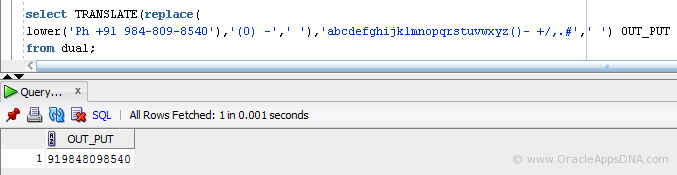
We can use this method when we are completely aware of what all non-numeric characters that would be present in the input value. Here in this example i am trying to remove non-numeric characters from phone number field
SELECT TRANSLATE(REPLACE(LOWER('Ph +91 984-809-8540'),'(0) -',' '),'abcdefghijklmnopqrstuvwxyz()- +/,.#',' ') OUT_PUT FROM dual;
rs from phone number field
SELECT TRANSLATE(REPLACE(LOWER('Ph +91 984-809-8540'),'(0) -',' '),'abcdefghijklmnopqrstuvwxyz()- +/,.#',' ') OUT_PUT FROM dual;
1.Translate_and_Replace Function
The above query would return a output as “919848098540” but if the input is something like ‘Ph: +91 984-809-8540‘ then this would return an output ‘:919848098540‘ since we are not handling the character ‘:‘. So we can’t go for this method if we are not sure of the all possible non-numeric characters that would come in as input.

Using Regular Expression:

regexp_replace function replaces string with regular expression matching supports. The simplest format for this function is:
REGEXP_REPLACE (source_string, pattern_to_find, pattern_to_replace_by)
For more information about regexp_replace please read this article from oracle.com
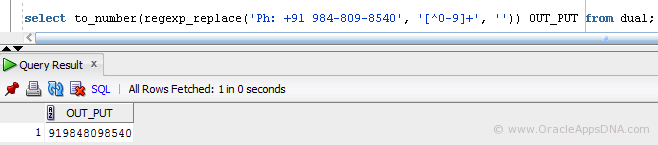
SELECT to_number(regexp_replace('Ph: +91 984-809-8540', '[^0-9]+', '')) OUT_PUT FROM dual;
2.regexp_replace The above statement would replace all the characters except the digits 0-9 with null.
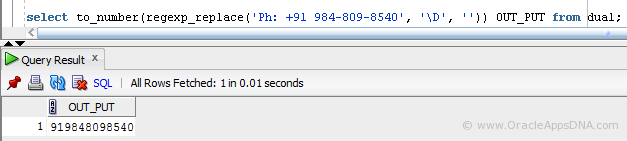
SELECT to_number(regexp_replace('Ph: +91 984-809-8540', '\D', '')) OUT_PUT FROM dual;
In this statement ‘\D’ would find all Non-digit characters and the will be replaced by null.
3.regexp_replace
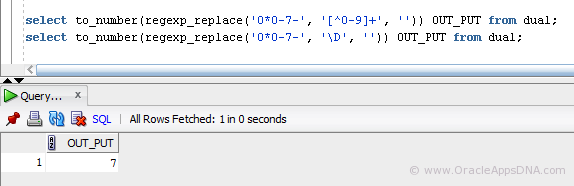
Though the above two statements works well, there is a scenario where these two statements fail to work, let me tell you with an example
SELECT to_number(regexp_replace('0*0-7-', '[^0-9]+', '')) OUT_PUT FROM dual;
SELECT to_number(regexp_replace('0*0-7-', '\D', '')) OUT_PUT FROM dual;
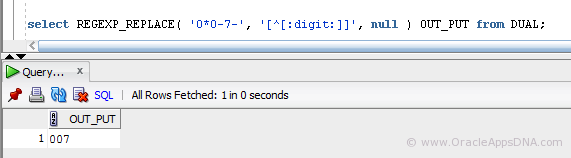
we expect the above statement to return ‘007’ instead they would return ‘7’. this method omitts if we have digit ‘0’ as prefix. 4.regexp_replace
The best method I found is to use regexp Metacharacter ‘:digit:‘ which matches digits 0-9
SELECT REGEXP_REPLACE( '0*0-7-', '[^[:digit:]]', NULL ) OUT_PUT FROM DUAL;
SELECT regexp_replace( 'Ph: +91 984-809-8540', '[^[:digit:]]', NULL ) FROM dual;
5.regexp_replace